


Practice VCAP-NV Deploy 2020 3V0-643 exam. Online Exam Practice Tests with detailed explanations! Pass 3V0-643 with confidence!
3V0-643 - VMware Certified Advanced Professional 6 - Network Virtualization Deployment Exam Practice Tests 2021 | CertkingdomPDF
NEW QUESTION 12
Enable and configure cross vCenter support for and NSX implementation that contains two vCenter Servers:
vcsa-01a.corp.local and vcsa-01b.corp.local
Requirements:
vCenter: vcsa-01a.corp.local and vcsa-01b.corp.local
Credentials: [email protected] / VMware1!
NSX Manager Credentials: admin/VMware1!
The NSX Manager registered to vcsa-01a.corp.local should be responsible for all universal NSX objects.
A segment ID range of 16789-17563 is available for use with this exercise.
NOTE:
Allow time for synchronization to complete.
HOL LAB for Practice:
See the explanation part for complete solution.
Answer:
Explanation:
SOLUTION:
(1) select home. select installation select NsManager - b. select
logical network preparation tab. select segment ID. edit and enter pool id 6001-7000 do the same for Nsx MAnager -a and put pool id 5001-6000. be sure there is no overlaping of segment id in both the nsx managers.
(2) open Nsx Manager a and Nsx Manager B and start the universal synchoraniztion service from summary.
note: you can start the services in the beging to avoid any delay
Assign Primary Role to 192.168.110.15

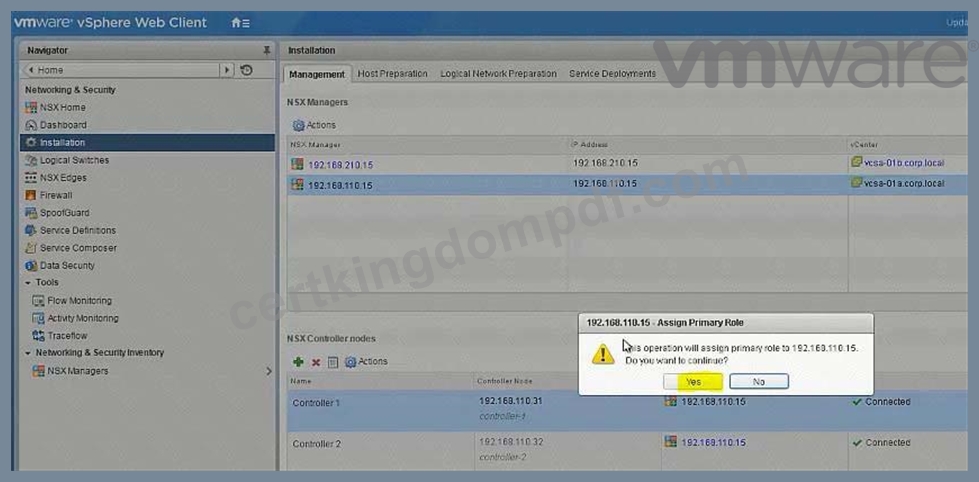


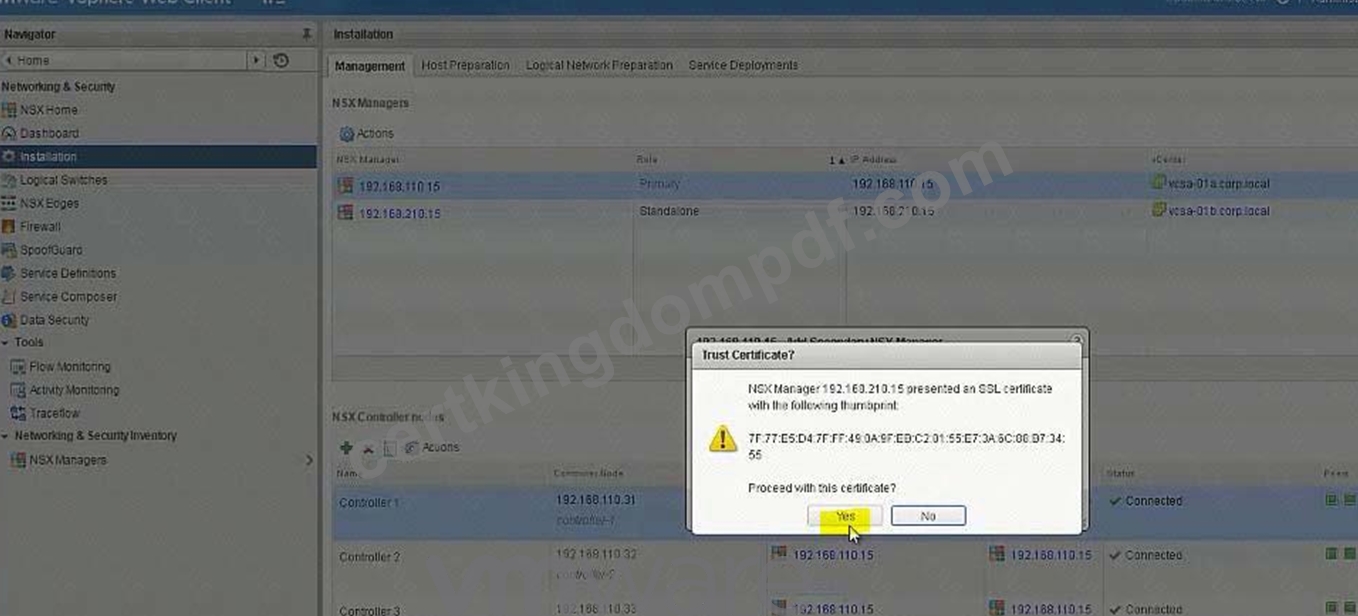
Add Secondary NSX Manager


NEW QUESTION 13
You have been tasked with modifying an existing NSX API call to capture flow information for an organization. The existing API call is located on the ControlCenter desktop in a file name flowapi.txt.
The API call should be modified to collect Layer3 flow statistics between the dev-web-01a and the ControlCenter virtual machine.
Requirements:
vCenter: vcsa01a.corp.local
Credential: [email protected] / VMware1!
File location: flowapi.txt on the desktop of ControlCenter.
Modify and Save the existing API call to capture the requested information.
A REST Client has been added to Chrome and Firefox for this exercise.
Output the Response Body to a text file called apiresults.txt on the desktop of ControlCenter.
******************flowapi.txt***********************
https://<nsxmgr-ip>/api/2.1/app/flow/flowstats?contextId=datacenter-21&flowType=TCP_UDP&startTime
=0&endTime=
https://192.168.110.15/api/2.1/app/flow/flowstats?contextId=vm-26&flowType=Layer3&startTime=0&endT ime=1320917094000&
******************flowapi.txt***********************
HOL LAB for Practice:
See the explanation part for complete solution.
Answer:
Explanation:
SOLUTION:
Access the MOB by entering the following URL
https://vcsa-01a.corp.local/mob
[email protected]
VMware1!


Note down the vm number of dev-web-01a (in exam its like vm-216)
Then update flowapi.txt as
******************flowapi.txt***********************
https://<nsxmgr-ip>/api/2.1/app/flow/flowstats?contextId=datacenter-21&flowType=TCP_UDP&startTime
=0&endTime=
https://192.168.110.15/api/2.1/app/flow/flowstats?contextId=vm-216&flowType=Layer3
&startTime=0&endTime=1320917094000&startIndex=0&pageSize=2
******************flowapi.txt***********************
Then go to RESTClient.
GET
https://192.168.110.15/api/2.1/app/flow/flowstats?contextId=vm-216&flowType=Layer3
&startTime=0&endTime=1320917094000&startIndex=0&pageSize=2
SEND
Copy the content of "Response Body"
Paste in notepad and Save As "apiresults.txt"on the desktop of ControlCenter.


NEW QUESTION 14
Provide automatic IP assignment for the servers on the DEV-DB-Tier-01-NEW segment.
Requirements:
vCenter: vcsa-01a.corp.local
Credentials: [email protected] / VMware1!
Edge: Dev-Edge
Automatically allocate IP addreesses in the 172.16.30.100-149 range.
Lease time: 1 hour
Ensure hosts that receive an IP assignment will be able to reach the other Dev subnets.
The legacyhost-NEW with the MAC address 40:00:00:00:00:01 must always be assigned 172.16.30.99 Ensure other parameters match those of the dynamic allocation mechanism (Task1).
Enable logging with the highest level of detail for automatic IP allocations.
Ensure all requirements have been met.
NOTE:
Do not configure DHCP Relay agent on the Dev-DLR-NEW as this will be done by another administrator.
HOL LAB for Practice:
DHCP and other questions 7, 8, 9
See the explanation part for complete solution.
Answer:
Explanation:
SOLUTION:

Add Pool as per given details:

Add Pool as per given details:


NEW QUESTION 15
Build a multi-tier network capable of supporting application virtual machines deployed across multiple vCenter instances.
Requirements:
vCenter: vcsa-01a.corp.local
Credentials: [email protected] / VMware1!
Resource Pools: Management and Edge Cluster 1A
The underlying physical network does not support multicast.
All new items created must have a prefix of "U" followed by their function name and a suffix of "New".
i.e. U-App-Tier-NEW.
Create a LS for HA management interface calle U-HA-VXLAN=NEW but do not enable HA on any of the edge devices deployed.
Deploy logical switches using separate subnets for the three tier application shared by both NSX Manager instances.
Deploy the required east-west routing component used across multiple vCenter instances for the multi-tier network.
Utilize a default gateway up to the Perimeter-Gateway02 (tenant router) from the east/west router.
Utilize a static route from the tenant router to reach the three tiers of the application.
Subnets for the tiers:
172.7.10.0/24 for the Web Tier.
172.17.20.1/24 for the App Tier.
172.17.30.0/24 for the Database Teir.
Use the first available IP address for the router on each of the tiers.
Subnet for the Transit VXLAN uplink from the application tier routing to the tenant router.
192.168.190.0/29
Uplink IP address of the application tier should be the first available IP address.
Downlink from the tenant router will use the second available IP addresses.
The password for new edge device(s) must be VMware1!VMware1!
Add all virtual machines with a prefix "universal-" to their respective segments.
Ensure all LIFs are reachable from ControlCenter.
HOL LAB for Practice:
See the explanation part for complete solution.
Answer:
Explanation:
SOLUTION:
universal transport zone
logical switches
U-HA-VXLAN-NEW
U-Transit-NEW
U-Web-Tier-NEW
U-App-Tier-New
U-DB-Tier-New
New DLR U-DLR-NEW
HA Interface - U-HA-VXLAN-NEW
Interface below
- U-Transit-NEW uplink 192.168.190.1
- U-Web-Tier-NEW internal 172.17.10.1
- U-App-Tier-NEW internal 172.17.20.1
- U-Db-Tier-NEW internal 172.17.30.1
Gateway
-U-Transit-NEW
Ip 192.168.190.2
PGW02 vnic4 U-Transit-NEW 192.168.190.2


Create 5 logical switches
U-Transit-NEW
U-Web-Tier-NEW
U-App-Tier-NEW

U-DB-Tier-NEW
Add VMs to relevant newly created Logical Switches.


No need


Create new Universal Logical (Distributed) Router:
U-DLR-NEW


U-Uplink-NEW(U-Transit-NEW)
Select U-Transit-NEW logical swicth here


Perimeter-Gateway-02

To-Universal-DLR
Select U-Transit-NEW


172.17.0.0/16
192.168.190.1
To-Universal-DLR
NEW QUESTION 16
The troubleshooting NSX deployment is growing and running out of compute capacity. An additional ESXi host is being added for VXLAN.
Host preparation has failed on esx-05a.corp.local on several attempts and the Compute Cluster 2A was left in an error state, determine and resolve the issue.
Requirements:
vCenter: vcsa-01a.corp.local
Credentials: [email protected] / VMware1!
Cluster: Compute Cluster 2A
IP Pool: Compute-2A
Transport Zone: Local-Transport-Zone-A
Esx-05a.corp.local IP information:
IP: 192.168.110.58
Netmask: 255.255.255.0
Gateway: 192.168.110.1
DNS: 192.168.110.10
1-Resolve deployment issue.
2-Prepare esx-05-a.corp.local for NSX in Compute Cluster 2A.
3-Ensure once the issue is resolved with the Compute Cluster 2A cluster, that it is connected to Local-Transport-Zone-A.
HOL LAB for Practice:
No Lab Module available
See the explanation part for complete solution.
Answer:
Explanation:
SOLUTION:
Follow the steps as:


NEW QUESTION 17
Configure the Layer 3 connectivity between the newly created Dev-segments by assigning them to a new DLR named Dev-DLR-NEW.
Requirements:
vCenter: vcsa-01a.corp.local
Ccredentials: [email protected] . VMware1!
Default GW for Dev-subnets:
Dev-Web-Tier-01-NEW172.16.10.1/24
Dev-App-Tier-01-NEW172.16.20.1/24
Dev-DB-Tier-01-NEW172.16.30.1/24
DLR Settings:
DLR Name: Dev-DLR-NEW
Uplink IP Address: 192.168.6.5/30
Interface: Dev-Transit
Password: VMware1!WMware1!
Cluster: Management & Edge Cluster
Ensure east-west routing has been optimized.
The control plane failover should begin 15 seconds on logical switch HA-VXLAN.
Ensure secure shell is available.
Connect the Web, App and DB virtual machines to their respective dev tiers.
Dev-web-01, Dev-web-02a, Dev-web-04a
Dev-app-01a
Dev-db-01a
HOL LAB for Practice:
also deploy Distributed logical router DLR in the same way the lab.
See the explanation part for complete solution.
Answer:
Explanation:
SOLUTION:
Add VMs to respective Logical Switches:


No need for below
To change the control plane failover within 15 seconds use the RESTClient as shown below or the Postman application in Chrome.
Open Firefox
Open RESTClient from Firefox
Authentication
Basic Authenticaion
Admin
VMware1!
Headers
Custom Headers
Content-Type
Application/xml

Note down the edge id of newly created DLR (in exam its edge-12)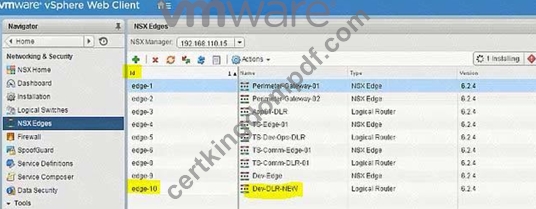
There will be a NSX API guide on desktop and look for "declaredeadtime".
Or memorize below string:
URL: https://192.168.110.15/api/4.0/edges/edge-10/highavailability/config Note: in exam its edge-12 but make sure!

Change the value to 15
Body:
<highAvailability>
<declareDeadTime>15</declareDeadTime>
</highAvailability>

NEW QUESTION 18
Create a backup of only the vDS portgroup the NSX controllers utilize along with the NSX Firewall configuration. Also, the security team had identified a missing security policy that needs to be added.
Requirements:
vCenter: vcsa-01a.corp.local
Credentials: [email protected] / VMware1!
Components to backup:
vDS Portgroup that the controllers utilize.
NSX Firewall configuration.
Backup file name: vdsPortGroup-backup-NEW.zip, nsxfw-backup-NEW.xml
Backup file location: Desktop of the ControlCenter.
Security Policy:
File to import: sec-policy-blueprint located on the desktop of the ControlCenter.
Backup only the vDS portgroup that the NSX Controllers utilize.
Backup the NSX Firewall configuration.
Import the sec-policy.blueprint file
Ensure requirements are met.
HOL LAB for Practice:
See the explanation part for complete solution.
Answer:
Explanation:
SOLUTION:
select Network & Security. select service composer. select 192.168.110.15.
select security policy tab. click on + sign enter name sec-policy-blueprint.
click next 3 times. click finish. select sec-policy-blueprint. click right mouse button select export configuration. enter name sec-policy-blueprint. click next select sec-policy-blueprint. click next. click finish. select desktop location.
enter name sec-policy-blueprint. click save. select sec-policy-web and delete it.
Verify NSX Controllers' vDS Portgroup
Vds-mgmt-a_Management network (under site A vcenter networking)


NEW QUESTION 19
You have been tasked with enabling syslog on the NSX Manager (nsmgr-01a.corp.local) and all NSX Controllers.
Requirements:
vCenter: vcsa-01a.crop.local
NSX Manager A: nsxmgr-01a.corp.local
Password: VMware1!
Syslog Information:
Server: 192.168.110.24
Port: 514
Protocol: UDP
Header Information:
Authentication: Basic
Content-Type: application/xml
Enable syslog for NSX Manager.
Enable syslog for NSX controllers.
HOL LAB for Practice:
See the explanation part for complete solution.
Answer:
Explanation:
SOLUTION:


Open API guide from desktop, scroll down for Controller Syslog URI.
In exam search function doesn't work so you should be familiar with the document.
In exam, user hostname instead of IP address (IP address wont work).
For version (2.0), also check API guide version, it could be 2.1 or 2.0 GET
https:// nsxmgr-01a.corp.local/api/2.0/vdn/controller/controller-1/syslog

Copy the required parameters from API guide or memorize.


Verify
Do the same for controller-2
Do the same for controller-3
NEW QUESTION 20
In the previous scenario, vCenter vcsa-b.corp.local was configured for NSX. Now the hosts must be prepared for NSX and the initial VXLAN configuration should be completed.
Requirements:
vCenter: vcsa-01b.corp.local
Credentials: [email protected] / VMware1!
Cluster: Compute Cluster 1B
ESXi Hosts: esx-01b.corp.local, esx-02b.corp.local
VTEP Information:
VMKNic Teaming Policy: Fail Over
VLAN: 0
MTU: 1600
IP Pools for VTEP:
* Name: Compute_1B_VTEP_Pool-New
* Gateway: 192.168.230.1
* Prefix Length: 24
* Static IP Pool: 192.168.230.51 - 192.168.230.60
* Segment ID Pool: 6001-7000 - HOL 1903-01 Page 26-36
* VXLAN Span: Compute Cluster 1B - HOL 1903-01 Page 26-36
* Transport Zone: Local-Transport-Zone-B-New - HOL 1903-01 Page 26-36
* Host must be prepared for NSX
* Use provided information to complete the initial VXLAN configuration.
* The underlying physical network does not support multicast.
* Ensure that requirements are met:
* Create the IP Pool as given:
* Do the Host preparation.
* Create a Local Transport Zone as given. - HOL 1903-01 Page 26-36
* Create the segment ID as given. - HOL 1903-01 Page 26-36
HOL LAB for Practice:
http://docs.hol.vmware.com/hol-isim/HOL-2019/hol-1903-01-nsxinstall-p2.htm and LAB - HOL 1903-01 Page 26-36 See the explanation part for complete solution.
Answer:
Explanation:
SOLUTION:
HOL 1903-01 Page 26-36
Login to vCenter b Web Client and from Networking and Security -> Installation -> select to SiteB NSX Manager -> Host Preparation and prepare the hosts as below:


Add Static Pool as per give details in the QUESTION


NEW QUESTION 21
......
The best 3V0-643 exam study material and preparation tool is here: https://www.certkingdompdf.com/3V0-643-latest-certkingdom-dumps.html