


AZ-220 Practice Exam Tests Latest Updated on Nov-2021
Pass AZ-220 Exam in First Attempt Guaranteed Dumps!
AZ-220:Microsoft Azure IoT Developer Certification Path
AZ-220:Microsoft Azure IoT Developer Exam is foundation level Certification. It is strongly recommended that aspirants for this exam have good command on at least one Azure-supported language, including C#, Node, C, or Python. Anyone who is having keen interest and familiar with general Microsoft Azure IoT developer concepts and the technologies. More than 85% of IoT development role require a good foundation of Microsoft Azure IoT developer concepts.
NEW QUESTION 48
You have an Azure subscription that contains an Azure IoT hub, an Azure IoT Edge gateway, and 1,000 leaf devices. The leaf devices use a custom communication protocol that is NOT supported by the IoT hub.
You need to configure the gateway to meet the following requirements:
Minimize the number of connections between the gateway and the IoT hub.
Support addressing cloud-to-device messages to individual leaf devices.
How should you configure the gateway? To answer, select the appropriate options in the answer area.
NOTE: Each correct selection is worth one point.
Answer:
Explanation:
Reference:
https://docs.microsoft.com/en-us/azure/iot-edge/iot-edge-as-gateway
NEW QUESTION 49
You have an Azure IoT hub.
You plan to attach three types of IoT devices as shown in the following table.
You need to select the appropriate communication protocol for each device.
What should you select? To answer, drag the appropriate protocols to the correct devices. Each protocol may be used once, more than once, or not at all. You may need to drag the split bar between panes or scroll to view content.
NOTE: Each correct selection is worth one point.
Answer:
Explanation:
Explanation:
Box 1: AMQP
Use AMQP on field and cloud gateways to take advantage of connection multiplexing across devices.
Box 2: MQTT
MQTT is used on all devices that do not require to connect multiple devices (each with its own per-device credentials) over the same TLS connection.
Box 3: HTTPS
Use HTTPS for devices that cannot support other protocols.
Reference:
https://docs.microsoft.com/en-us/azure/iot-hub/iot-hub-devguide-protocols
NEW QUESTION 50
You plan to deploy an Azure IoT hub.
The IoT hub must support the following:
* Three Azure IoT Edge devices 2,500 IoT devices
* Each IoT device will spend a 6 KB message every five seconds.
You need to size the IoT hub to support the devices. The solution must minimize costs. What should you choose?
- A. one unit of the B1 tier
- B. one unit of the B2 tier
- C. one unit of the S1 tier
- D. one unit of the S3 tier
Answer: D
Explanation:
2500* 6 KB * 12 = 180,000 KB/minute = 180 MB/Minute.
B3, S3 can handle up to 814 MB/minute per unit. Incorrect Answers:
A, C: B1, S1 can only handle up to 1111 KB/minute per unit B: B2, S2 can only handle up to 16 MB/minute per unit.
Reference:
https://docs.microsoft.com/en-us/azure/iot-hub/iot-hub-scaling
NEW QUESTION 51
You have an Azure IoT Edge solution.
You plan to deploy an Azure Security Center for IoT security agent. You need to configure the security agent to meet the following requirements:
Connection events must be reported as high priority.
High priority events must be collected every seven minutes.
How should you configure the azureiotsecurity module twin? To answer, drag the appropriate values to the correct locations. Each value may be used once, more than once, or not at all. You may need to drag the split bar between panes or scroll to view content.
NOTE: Each correct selection is worth one point.
Answer:
Explanation:
NEW QUESTION 52
Your company is creating a new camera security system that will use Azure IoT Hub.
You plan to use an Azure IoT Edge device that will run Ubuntu Server 18.04.
You need to configure the IoT Edge device.
Which three actions should you perform in sequence? To answer, move the appropriate actions from the list of actions to the answer area and arrange them in the correct order.
Answer:
Explanation:
Explanation:
Step 1: Run the following commands
Install the container runtime.
Azure IoT Edge relies on an OCI-compatible container runtime. For production scenarios, we recommended that you use the Moby-based engine provided below. The Moby engine is the only container engine officially supported with Azure IoT Edge. Docker CE/EE container images are compatible with the Moby runtime.
Install the Moby engine.
sudo apt-get install moby-engine
Install the Moby command-line interface (CLI). The CLI is useful for development but optional for production deployments.
sudo apt-get install moby-cli
Install the security daemon. The package is installed at /etc/iotedge/.
sudo apt-get install iotedge
Step 2: From IotHub,create an IoT Edge device registry entry.
Note: In your IoT Hub in the Azure portal, IoT Edge devices are created and managed separately from IOT devices that are not edge enabled.
Sign in to the Azure portal and navigate to your IoT hub.
In the left pane, select IoT Edge from the menu.
Select Add an IoT Edge device.
Provide a descriptive device ID. Use the default settings to auto-generate authentication keys and connect the new device to your hub.
Select Save.
Retrieve the connection string in the Azure portal
1. When you're ready to set up your device, you need the connection string that links your physical device with its identity in the IoT hub.
2. From the IoT Edge page in the portal, click on the device ID from the list of IoT Edge devices.
3. Copy the value of either Primary Connection String or Secondary Connection String.
Step 3: Add the connection string to..
To manually provision a device, you need to provide it with a device connection string that you can create by registering a new device in your IoT hub.
Open the configuration file.
sudo nano /etc/iotedge/config.yaml
Find the provisioning configurations of the file and uncomment the Manual provisioning configuration section. Update the value of device_connection_string with the connection string from your IoT Edge device.
Save and close the file.
After entering the provisioning information in the configuration file, restart the daemon:
sudosystemctl restart iotedge
Reference:
https://docs.microsoft.com/en-us/azure/iot-edge/how-to-install-iot-edge-linux
NEW QUESTION 53
Note: This question is part of a series of questions that present the same scenario. Each question in the series contains a unique solution that might meet the stated goals. Some question sets might have more than one correct solution, while others might not have a correct solution.
After you answer a question in this question, you will NOT be able to return to it. As a result, these questions will not appear in the review screen.
You have an Azure IoT solution that includes an Azure IoT hub, a Device Provisioning Service instance, and
1,000 connected IoT devices.
All the IoT devices are provisioned automatically by using one enrollment group.
You need to temporarily disable the IoT devices from the connecting to the IoT hub.
Solution: You delete the enrollment group from the Device Provisioning Service.
Does the solution meet the goal?
- A. Yes
- B. No
Answer: B
Explanation:
Instead, from the Device Provisioning Service, you disable the enrollment group, and you disable device entries in the identity registry of the IoT hub to which the IoT devices are provisioned.
Reference:
https://docs.microsoft.com/bs-latn-ba/azure/iot-dps/how-to-unprovision-devices
NEW QUESTION 54
You need to install the Azure IoT Edge runtime on a new device that runs Windows 10 IoT Enterprise.
Which four actions should you perform in sequence? To answer, move the appropriate actions from the list of actions to the answer area and arrange them in the correct order.
Answer:
Explanation:
1 - From Azure IoT Hub, create an IoT Edge Device
2 - From an elevated PowerShell promot, run the following command.
3 - From the elevant PowerShell Promot, run the following command.
4 - Enter the loT Edge device connection string.
Reference:
https://docs.microsoft.com/en-us/azure/iot-edge/module-composition
NEW QUESTION 55
From the Device Provisioning Service, you create an enrollment as shown in the exhibit. (Click the Exhibit tab.)
You need to deploy a new IoT device.
What should you use as the device identity during attestation?
- A. the random string of alphanumeric characters
- B. a self-signed X.509 certificate
- C. the endorsement key of the device's Trusted Platform Module (TPM)
- D. the HMACSHA256 hash of the device's registration ID
Answer: D
Explanation:
Each device uses its derived device key with your unique registration ID to perform symmetric key attestation with the enrollment during provisioning. To generate the device key, use the key you copied from your DPS enrollment to compute an HMAC-SHA256 of the unique registration ID for the device and convert the result into Base64 format.
Reference:
https://docs.microsoft.com/en-us/azure/iot-edge/how-to-auto-provision-symmetric-keys
NEW QUESTION 56
You have an Azure IoT Central application that has a custom device template.
You need to configure the device template to support the following activities:
Return the reported power consumption.
Configure the desired fan speed.
Run the device reset routine.
Read the fan serial number.
Which option should you use for each activity? Each correct answer presents part of the solution.
NOTE: Each correct selection is worth one point.
Answer:
Explanation:
Reference:
https://docs.microsoft.com/en-us/azure/iot-central/core/howto-set-up-template
NEW QUESTION 57
You are planning a proof of concept (POC) that will use an Azure IoT hub.
You have two self-signed client authentication certificates named Cert1 and Cert2. Cert1 has a basic constraint that contains Subject Type=C You need to identify which certificates to use.
What should you identify? To answer, select the appropriate options in the answer area.
NOTE: Each correct selection is worth one point.
Answer:
Explanation:
Reference:
https://docs.microsoft.com/en-us/azure/iot-dps/concepts-x509-attestation
NEW QUESTION 58
You are troubleshooting an Azure IoT hub.
You discover that some telemetry messages are dropped before they reach downstream processing.
You suspect that IoT Hub throttling is the root cause.
Which log in the Diagnostics settings of the IoT hub should you use to capture the throttling error events?
- A. Connections
- B. Routes
- C. DeviceTelemetry
- D. C2DCommands
Answer: C
Explanation:
The device telemetry category tracks errors that occur at the IoT hub and are related to the telemetry pipeline.
This category includes errors that occur when sending telemetry events (such as throttling) and receiving telemetry events (such as unauthorized reader). This category cannot catch errors caused by code running on the device itself.
Note: The metric d2c.telemetry.ingress.sendThrottle is the number of throttling errors due to device throughput throttles.
Reference:
https://docs.microsoft.com/en-us/azure/iot-hub/iot-hub-monitor-resource-health
NEW QUESTION 59
You have an IoT device that has the following configurations:
Hardware: Raspberry Pi Operating system: Raspbian
You need to deploy Azure IoT Edge to the device.
Which two actions should you perform? Each correct answer presents part of the solution.
NOTE: Each correct selection is worth one point.
- A. Install the container runtime.
- B. Update the IoT Edge runtime.
- C. Install the IoT Edge security daemon.
- D. Run the Deploy-IoTEdge PowerShell cmdlet on the IoT Edge device.
Answer: B,C
Explanation:
The Azure IoT Edge runtime is what turns a device into an IoT Edge device. The runtime can be deployed on devices as small as a Raspberry Pi or as large as an industrial server.
The IoT Edge security daemon provides and maintains security standards on the IoT Edge device. The daemon starts on every boot and bootstraps the device by starting the rest of the IoT Edge runtime.
Reference:
https://docs.microsoft.com/en-us/azure/iot-edge/how-to-install-iot-edge
NEW QUESTION 60
You have an Azure IoT Edge solution.
You plan to deploy an Azure Security Center for IoT security agent. You need to configure the security agent to meet the following requirements:
Connection events must be reported as high priority.
High priority events must be collected every seven minutes.
How should you configure the azureiotsecurity module twin? To answer, drag the appropriate values to the correct locations. Each value may be used once, more than once, or not at all. You may need to drag the split bar between panes or scroll to view content.
NOTE: Each correct selection is worth one point.
Answer:
Explanation: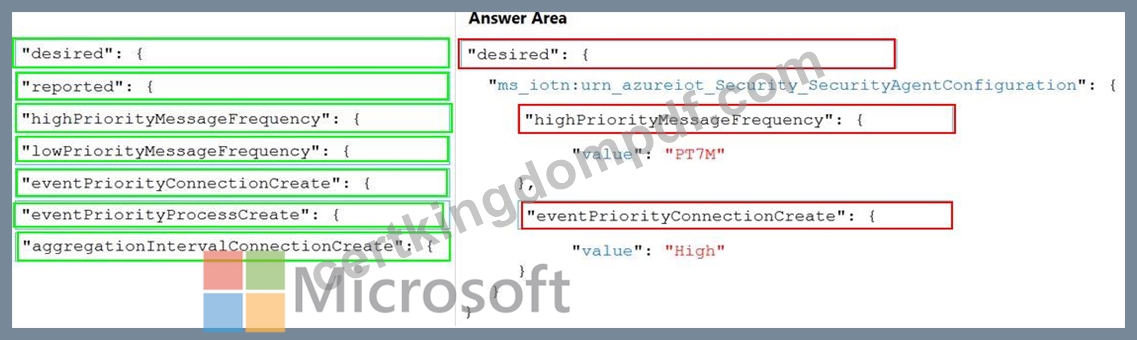
NEW QUESTION 61
You need to install the Azure IoT Edge runtime on a new device that runs Windows 10 IoT Enterprise.
Which four actions should you perform in sequence? To answer, move the appropriate actions from the list of actions to the answer area and arrange them in the correct order.
Answer:
Explanation:
Explanation:
Step 1: From Azure IoT Hub, create an IoT Edge Device
Step 2: Deploy-IoTEdge
The Deploy-IoTEdge command checks that your Windows machine is on a supported version, turns on the containers feature, and then downloads the moby runtime and the IoT Edge runtime. The command defaults to using Windows containers.
{Invoke-WebRequest -useb https://aka.ms/iotedge-win} | Invoke-Expression; ` Deploy-IoTEdge Step 3: Initialize-IoTEdge The Initialize-IoTEdge command configures the IoT Edge runtime on your machine. The command defaults to manual provisioning with Windows containers.
{Invoke-WebRequest -useb https://aka.ms/iotedge
Step 4: Enter the IoT Edge device connection string.
When prompted, provide the device connection string that you retrieved in step 1. The device connection string associates the physical device with a device ID in IoT Hub.
Reference:
https://docs.microsoft.com/en-us/azure/iot-edge/module-composition
NEW QUESTION 62
You are developing an Azure IoT Central application.
You add a new custom device template to the application.
You need to add a fixed location value to the device template. The value must be updated by the physical IoT device, read-only to device operators, and not graphed by IoT Central.
What should you add to the device template?
- A. a Cloud property
- B. a Location telemetry
- C. a Location property
Answer: C
Explanation:
For example, a builder can create a device template for a connected fan that has the following characteristics:
Sends temperature telemetry
Sends location property
Reference:
https://docs.microsoft.com/en-us/azure/iot-central/core/howto-set-up-template
NEW QUESTION 63
You have 100 devices that connect to an Azure IoT hub.
You plan to use Azure functions to process all the telemetry messages from the devices before storing the messages.
You need to configure the functions binding for the IoT hub.
Which two configuration details should you use to configure the binding? Each correct answer presents part of the solution.
NOTE: Each correct selection is worth one point.
- A. the connection string of the Azure Event Hub-compatible endpoint from the IoT Hub built-in endpoints
- B. the name of the resource group that contains the IoT hub
- C. the Azure Event-Hub compatible name
- D. the IoT hub's connection string shared access key that has Service connect permissions
Answer: A,C
Explanation:
EventHubName: Functions 2.x and higher. The name of the event hub. When the event hub name is also present in the connection string, that value overrides this property at runtime.
Connection: The name of an app setting that contains the connection string to the event hub's namespace.
Copy this connection string by clicking the Connection Information button for the namespace, not the event hub itself. This connection string must have send permissions to send the message to the event stream.
Reference:
https://docs.microsoft.com/en-us/azure/azure-functions/functions-bindings-event-iot-output
NEW QUESTION 64
You have 1,000 IoT devices that connect to an Azure IoT hub.
Each device has a property tag named city that is used to store the location of the device.
You need to update the properties on all the devices located at an office in the city of Seattle as quickly as possible. Any new devices in the Seattle office that are added to the IoT hub must receive the updated properties also.
What should you do?
- A. From the IoT hub, generate a query for the target devices.
- B. From Automatic Device Management, create an IoT device configuration.
- C. Deploy an Azure IoT Edge transparent gateway to the Seattle office and deploy an Azure Stream Analytics edge job.
- D. Create a scheduled job by using the IoT Hub service SDKs.
Answer: B
Explanation:
Automatic device management in Azure IoT Hub automates many of the repetitive and complex tasks of managing large device fleets. With automatic device management, you can target a set of devices based on their properties, define a desired configuration, and then let IoT Hub update the devices when they come into scope. This update is done using an automatic device configuration or automatic module configuration, which lets you summarize completion and compliance, handle merging and conflicts, and roll out configurations in a phased approach.
Reference:
https://docs.microsoft.com/en-us/azure/iot-hub/iot-hub-automatic-device-management
NEW QUESTION 65
You have an Azure IoT Edge device.
You need to modify the credentials used to access the container registry.
What should you modify?
- A. the IoT Edge module
- B. the $edgeAgent module twin
- C. the @edgeHub module twin
- D. the Azure IoT Hub device twin
Answer: B
Explanation:
The module twin for the IoT Edge agent is called $edgeAgent and coordinates the communications between the IoT Edge agent running on a device and IoT Hub. The desired properties are set when applying a deployment manifest on a specific device as part of a single-device or at-scale deployment.
These properties include:
* runtime.settings.registryCredentials.{registryId}.username
* runtime.settings.registryCredentials.registryId}.password
Reference:
https://docs.microsoft.com/en-us/azure/iot-edge/module-edgeagent-edgehub
NEW QUESTION 66
You have an existing Azure IoT hub.
You use IoT Hub jobs to schedule long running tasks on connected devices.
Which two operations do the IoT Hub jobs support directly? Each correct answer presents a complete solution.
NOTE: Each correct selection is worth one point.
- A. Send cloud-to-device messages.
- B. Disable IoT device registry entries.
- C. Trigger Azure functions.
- D. Update desired properties.
- E. Invoke direct methods.
Answer: D,E
Explanation:
Consider using jobs when you need to schedule and track progress any of the following activities on a set of devices:
Invoke direct methods
Update desired properties
Update tags
Reference:
https://docs.microsoft.com/en-us/azure/iot-hub/iot-hub-devguide-jobs
NEW QUESTION 67
......
Microsoft Certified: Azure IoT Developer Specialty Free Certification Exam Material from CertkingdomPDF with 128 Questions: https://www.certkingdompdf.com/AZ-220-latest-certkingdom-dumps.html