


2026 Updates For the Latest Network-Security-Essentials Free Exam Study Guide!
Best Network-Security-Essentials Exam Preparation Material with New Dumps Questions
NEW QUESTION # 24
After you enable content inspection, your users see a certificate warning when they browse the Internet. What is one way to resolve this? (Select one.)
- A. Configure a WebBlocker exception for your certificate server
- B. Install the current Firebox Proxy Authority certificate on your user workstations
- C. Import a trusted web server certificate to the Firebox
- D. Configure the HTTPS proxy policy to allow inbound traffic from your CA
Answer: B
Explanation:
When content inspection is enabled on a Firebox, it decrypts HTTPS traffic for inspection, which requires presenting its own certificate to the client devices. This often causes certificate warnings in web browsers because the certificate issued by the Firebox is not inherently trusted by the client browsers. To resolve this, you need to install the Firebox'sProxy Authority certificateon each user's workstation as a trusted certificate. This action will prevent browsers from displaying certificate warnings, as they will recognize the Firebox certificate as a trusted source for secure connections.
NEW QUESTION # 25
You can run TCP Dump directly from the Firebox.
- A. True
- B. False
Answer: B
Explanation:
You cannot runTCP Dumpdirectly from a Firebox device. While Firebox has various monitoring tools such as Traffic Monitor and Firebox System Manager, it does not natively support TCP Dump, which is a command-line tool primarily available on Linux-based systems. Instead, packet captures and traffic monitoring need to be handled through Firebox-specific tools or by exporting logs to external devices for further analysis.
NEW QUESTION # 26
You recently installed network monitoring software on your server and then performed a port scan for each IP address in the network. When the scan finishes, you notice that the server lost access to the Internet. What is the most likely cause of this issue? (Select one.)
- A. The server IP address was added to the Blocked Sites list because an IPS signature was matchedduring the port scan
- B. The server IP address was added to the Blocked Sites list because of the default packet handling port scan rule
- C. The policy that handles outbound traffic was automatically disabled because the Firebox was port scanned
- D. The server IP address was added to the Blocked Sites list because the network was flooded with ESP traffic during the port scan
- E. The port scan traffic matched a default HTTP proxy content type rule configured with a Block action
Answer: B
Explanation:
When a port scan is detected, Firebox devices with default settings often include a rule to add the source IP address of the scan to the Blocked Sites list to prevent potential threats. This is a standard security measure in Firebox configurations, aimed at mitigating the risk of network scanning attempts. Consequently, if the server you used to perform the port scan was added to the Blocked Sites list, it would lose Internet access as the device blocks any outgoing connections from that IP. This behavior aligns with Firebox's handling of port scan detection through default security rules.
NEW QUESTION # 27
When Mobile VPN is enabled, remote users receive the domain name and DNS servers from the Firebox Network Configuration by default.
- A. True
- B. False
Answer: A
Explanation:
WhenMobile VPNis enabled on a Firebox, remote users receive network configuration settings, including domain nameandDNS server informationfrom the Firebox by default. This setupensures that remote users can resolve internal domain names and access network resources as though they were connected directly to the internal network. This functionality is essential for maintaining consistent user experience and connectivity while working remotely.
NEW QUESTION # 28
Which of these sites are denied by the WebBlocker action shown in this image? (Select three.)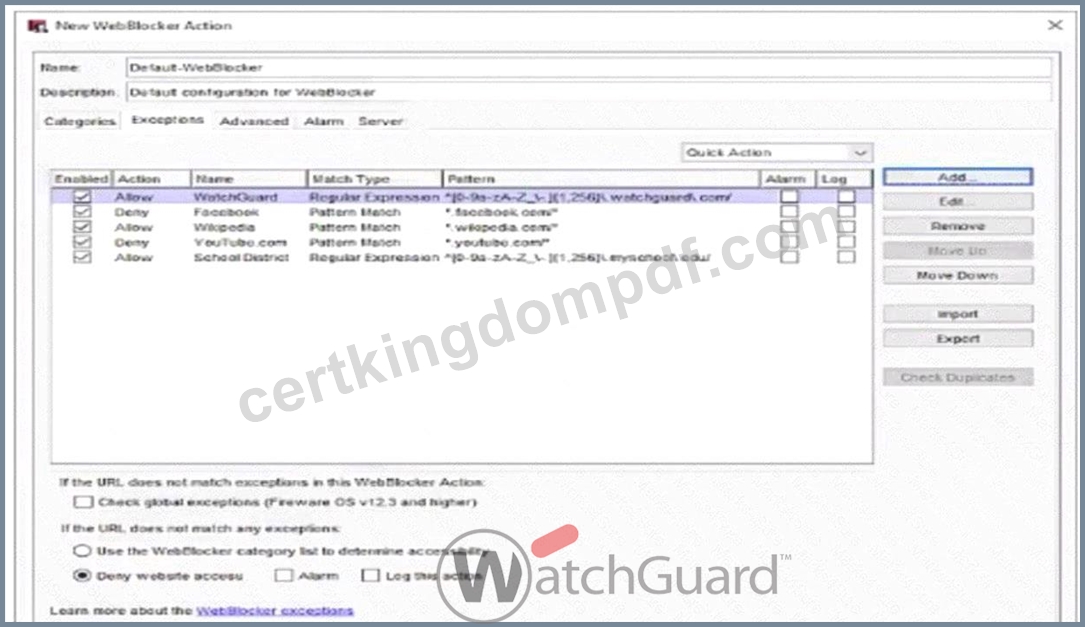
- A. www.youtube.com
- B. www.google.com
- C. www.watchguard.com/wgrd-blog
- D. schedule.myschool.edu
- E. login.facebook.com
- F. www.wikipedia.com/firewall
Answer: A,B,E
Explanation:
The WebBlocker action in the image contains bothAllowandDenyrules based on specific patterns:
* www.youtube.com- This is explicitly denied by the WebBlocker configuration for the pattern youtube.
com*.
* login.facebook.com- This would also be denied because it matches the pattern facebook.com*.
* www.google.com- There is no specificAllowrule for google.com or any associated subdomain, and since WebBlocker defaults toDenywhen a URL does not match any exceptions, www.google.com would be denied as well.
The other options:
* A.www.wikipedia.com/firewall- Allowed due to the wikipedia.com* pattern.
* D. schedule.myschool.edu- Allowed due to the regular expression matching *.myschool.edu.
* E.www.watchguard.com/wgrd-blog- Allowed by the regular expression for watchguard.com.
NEW QUESTION # 29
The Firebox can scan the contents of encrypted zip files with Gateway AntiVirus when HTTPS content inspection is enabled.
- A. True
- B. False
Answer: B
Explanation:
The Firebox cannot scan the contents of encrypted zip files even if HTTPS content inspection is enabled.
HTTPS content inspection allows the Firebox to inspect encrypted HTTPS traffic by decrypting it. However, the content within encrypted zip files remains inaccessible to Gateway AntiVirus scanning because the encryption key for the zip file is not available to the Firebox. This limitation is consistent with standard network security practices, where encrypted files need to be decrypted with a known key before content scanning can occur.
NEW QUESTION # 30
You can add your Firebox to WatchGuard Cloud but continue to manage it locally. When you do this, what additional features does WatchGuard Cloud provide for your locally-managed Firebox? (Select two.)
- A. Ability to schedule Firebox firmware updates
- B. Automatic Firebox firmware updates
- C. Live status and access to reports
- D. Real-time network traffic data
- E. Unified event correlation and analysis
Answer: A,C
Explanation:
When adding a Firebox to WatchGuard Cloud while maintaining local management:
* Option B: WatchGuard Cloud allows the scheduling of Firebox firmware updates, which provides flexibility in managing update timing without disrupting operations.
* Option E: It provides live status updates and reporting access, giving insights into device health and performance metrics for informed management decisions.
* Option A(Automatic firmware updates) is typically managed manually in a locally managed configuration.
* Option C(Real-time network traffic data) andOption D(Unified event correlation andanalysis) are advanced features that require full cloud management rather than hybrid (local/cloud) setup.
NEW QUESTION # 31
Your users have no network connectivity on their computers in the 10.0.40.0/24 network. You investigate and discover the DHCP address pool for this network is exhausted, but there are no available IP addresses in the network to assign. Which of these options can you use to expand the IP address space of this network? (Select two.)
- A. Enable a wireless SSID for the 10.0.40.1/24 network
- B. Change the IP address of the 10.0.40.1/24 network to 10.0.40.123/24
- C. Add 10.0.50.1/24 to the 10.0.40.1/24 network as a secondary network
- D. Bridge the 10.0.40.1/24 network across additional interfaces
- E. Create a Dynamic NAT rule for traffic from the 10.0.40.1/24 network going to the 10.0.50.1/24 network
Answer: C,D
Explanation:
* Adding a Secondary Network (10.0.50.1/24): By adding a secondary subnet (such as10.0.50.1/24) to the existing 10.0.40.1/24 network, you expand the IP address space, effectively increasing the number of available IP addresses for DHCP allocation.
* Bridging Across Additional Interfaces: Bridging the 10.0.40.1/24 network across multiple interfaces can also increase the available address pool by creating a larger logical network. This approach helps manage IP space across a broader range of devices without subnet fragmentation.
These methods provide scalable solutions to expand IP address availability within constrained network spaces.
NEW QUESTION # 32
What is true about this log message? (Select three.)
- A. The traffic is allowed outbound through the Firebox
- B. The HTTPS proxy identified a TLS v1.3 connection to the inbox.google.com SNI domain
- C. The traffic is allowed inbound through the Firebox
- D. The Gateway AntiVirus service denied the email traffic because it matches the 18.254 virus signature
- E. The Application Control service has identified the traffic as Gmail
Answer: A,B,E
Explanation:
Application Control Identifying Gmail Traffic: Application Control is capable of identifying and categorizing applications based on traffic patterns and signatures. In this case, it recognizes Gmail traffic, which is a typical function of Application Control for managing and monitoring web applications. This functionality allows administrators to monitor and control access to applications based on organizational policies.
HTTPS Proxy Identifies TLS v1.3 Connection: The HTTPS proxy in Firebox can inspect and manage encrypted traffic by recognizing details such as the Server Name Indication (SNI) field in TLS connections.
By identifying a TLS v1.3 connection to the inbox.google.com domain, the HTTPS proxy provides additional monitoring and control capabilities over encrypted connections.
Traffic Allowed Outbound Through the Firebox: Given that the log indicates outbound traffic, this confirms that the connection is permitted by the Firebox's policies for outbound traffic. Outbound traffic control is crucial for managing access to external resources and ensuring that only authorized traffic exits the network.
NEW QUESTION # 33
What steps must you take to send log messages from a Firebox to WatchGuard Cloud? (Select two.)
- A. Add the FQDN of your WatchGuard Cloud account as a Log Server on the Firebox
- B. Define an Authentication Key that all your Fireboxes use to communicate with WatchGuard Cloud
- C. Use the WatchGuard Cloud Add Device wizard to add the Firebox to WatchGuard Cloud
- D. Configure Dimension to synchronize log messages with WatchGuard Cloud
- E. Enable WatchGuard Cloud in the Firebox configuration
Answer: C,E
Explanation:
* Enable WatchGuard Cloud in Firebox Configuration: To send log messages to WatchGuard Cloud, you need to activate WatchGuard Cloud integration within the Firebox's configuration settings. This action prepares the device to communicate with WatchGuard Cloud and transfer log data.
* Use the WatchGuard Cloud Add Device Wizard: The Add Device wizard in WatchGuard Cloud is used to register and connect the Firebox to WatchGuard Cloud. This wizard guides administrators through the setup and ensures that the device is correctly configured to send logs and other data to the cloud.
These steps are required to establish connectivity and ensure that log messages are sent to WatchGuard Cloud.
Other options, such as adding an FQDN or configuring Dimension synchronization, are not necessary for this task.
NEW QUESTION # 34
When you migrate a configuration file from one Firebox to a new Firebox, which settings transfer to the new device? (Select two.)
- A. Management users
- B. DNS servers
- C. Feature key
- D. Certificates
- E. Policies
Answer: A,E
Explanation:
When migrating configurations:
* Option A: Management user settings transfer, preserving administrator access control configurations on the new device.
* Option C: Policies, including firewall rules, transfer, ensuring that network traffic handling settings are retained.
* Option B(Certificates) andOption D(DNS servers) are specific configurations often set manually and do not automatically transfer.
* Option E(Feature key) is unique to each device and must be installed separately on the new Firebox.
NEW QUESTION # 35
You configured your Firebox as a DHCP server and want to verify the status of the leased addresses. You found this information in Firebox System Manager > Status Report. What is true about DHCP leases in this deployment? (Select two.)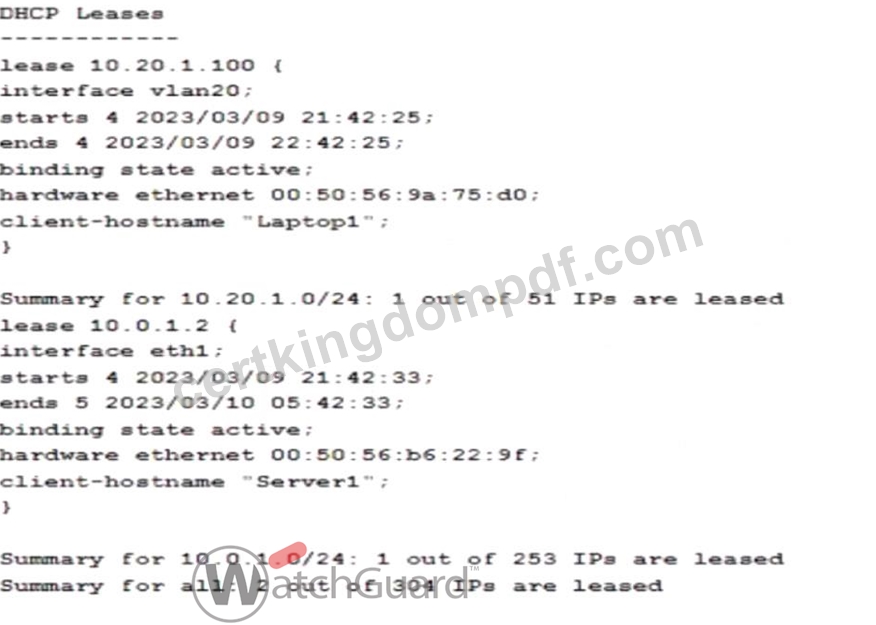
- A. DHCP leases for the 10.0.1.0/24 network are valid for 8 hours
- B. DHCP leases for the 10.20.1.0/24 network are valid for 24 hours
- C. 252 IP addresses are currently available in the address pool for the 10.0.1.0/24 network
- D. The MAC address for the host using 10.0.1.2 is 00:50:56:9a:75
- E. The hostname Server1 is associated with the IP address 10.20.1.100
Answer: A,C
Explanation:
Analyzing the DHCP lease information from the provided image:
* Lease Duration for 10.0.1.0/24 Network:
* The lease for IP address 10.0.1.2 on interface eth1 starts at 2023/03/09 21:42:33 and ends at 2023
/03/10 05:42:33, showing a lease duration of 8 hours. Thus, DHCP leases for the 10.0.1.0/24 network are set to be valid for 8 hours.
* Available IP Addresses in 10.0.1.0/24 Pool:
* The summary indicates that 1 out of 253 IPs is leased for the 10.0.1.0/24 subnet, meaning 252 IPs remain available in the address pool.
These details confirm the correct answers:BandD.
Other options, such as MAC address and hostname associations, do not match the data provided in the image, making them incorrect choices. Let me know if you need further assistance analyzing DHCP configurations on Firebox devices.
NEW QUESTION # 36
Some management tasks require you to use a specific management interface. Match the task below with the management interface that supports it.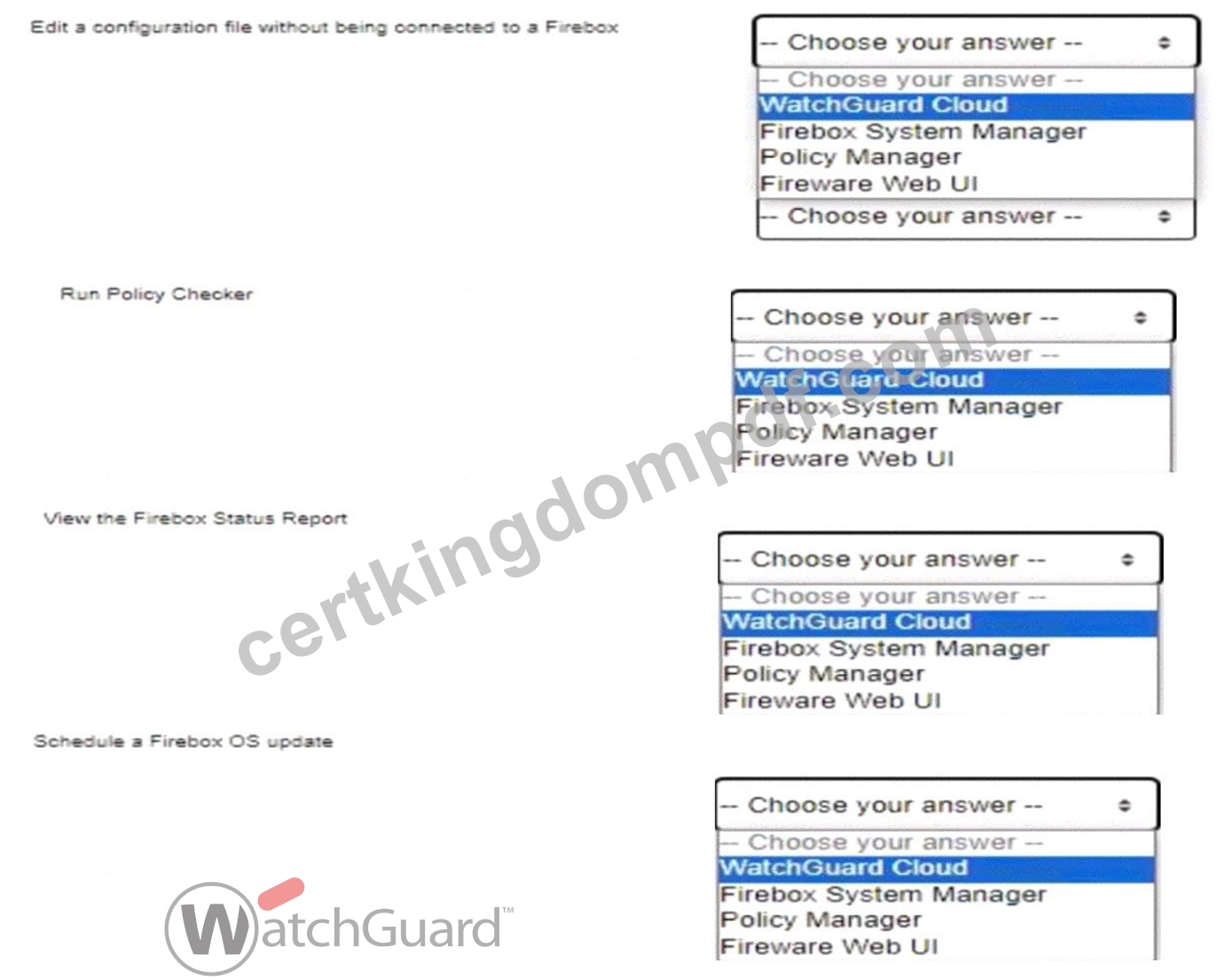
Answer:
Explanation: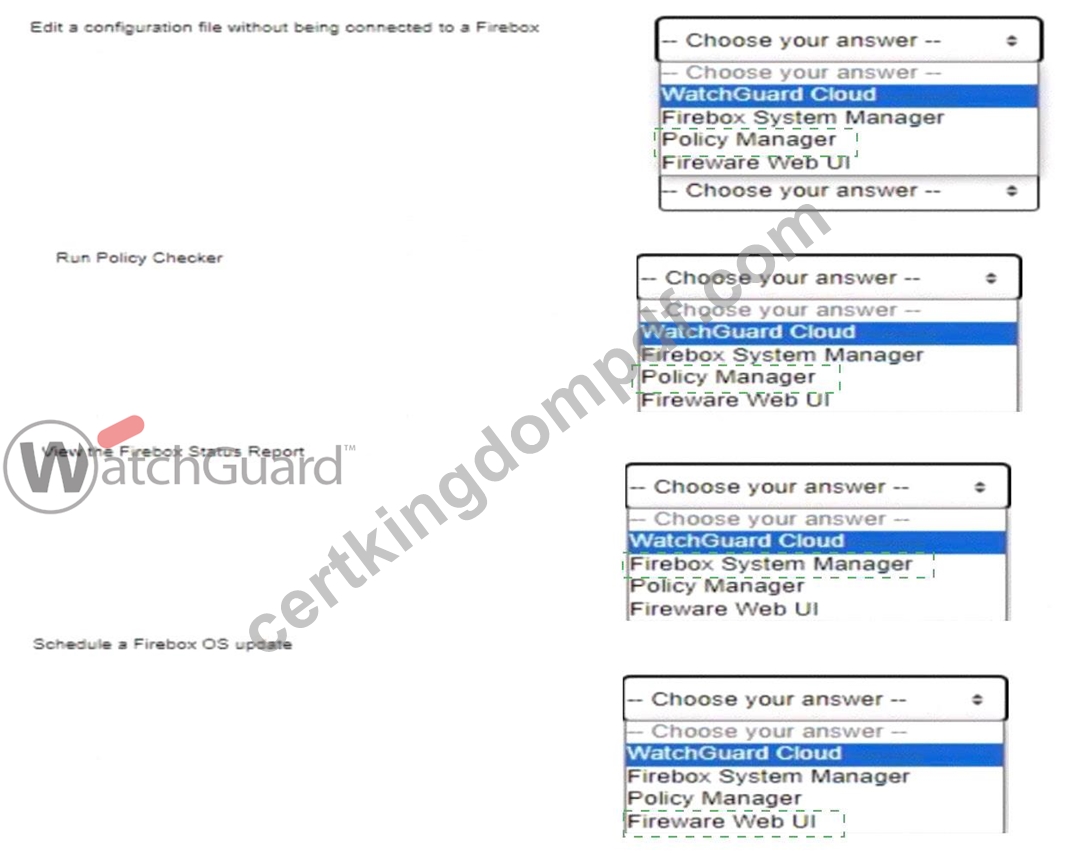
Explanation:
Here are the correct answers based on typical Firebox management interface capabilities:
* Edit a configuration file without being connected to a Fireboxanswer: Policy Manager Policy Manager allows administrators to edit a Firebox configuration file offline without a direct connection to the Firebox. This feature is helpful for preparing configuration changes in advance.
* Run Policy Checkeranswer: Policy Manager
The Policy Checker tool is included in Policy Manager, which checks configuration settings for errors before applying them. This tool provides an essential layer of validation, preventing misconfigurations.
* View the Firebox Status Reportanswer: Firebox System Manager
The Firebox System Manager (FSM) interface provides real-time status reporting on device health, traffic, and security services, which includes viewing the Firebox Status Report.
* Schedule a Firebox OS updateanswer: Fireware Web UI
Fireware Web UI includes options for scheduling OS updates for the Firebox, which can be managed remotely through a web interface.
These answers align with standard Firebox network security essentials and their recommended management interfaces for specific administrative tasks. Let me know if you need further assistance with related Firebox management topics
NEW QUESTION # 37
Users cannot download a PDF file from your intranet. You know the file is safe to download. When you review the log messages, you see that IntelligentAV identified the file as malicious. The only way to resolve this is to change the file extension.
- A. True
- B. False
Answer: B
Explanation:
When IntelligentAV identifies a file as malicious, users have options other than changing the file extension to resolve the issue. IntelligentAV relies on AI-driven detection, and if the PDF file isknown to be safe, an administrator can manually adjust the IntelligentAV settings or add an exception for the specific file.
Changing the file extension alone does not address the root of the detection and is not a reliable solution to bypass IntelligentAV checks.
NEW QUESTION # 38
Which of these is a valid host IP address in the subnet 10.0.1.0/24? (Select one.)
- A. 10.0.0.1/24
- B. 10.0.10.24/24
- C. 10.0.1.100/24
- D. 10.0.1.0/24
- E. 10.0.1.255/24
Answer: C
Explanation:
The subnet 10.0.1.0/24 has an IP range from10.0.1.1 to 10.0.1.254. In a /24 subnet:
* The first address (10.0.1.0) is thenetwork addressand cannot be assigned to a host.
* The last address (10.0.1.255) is thebroadcast addressand also cannot be assigned to a host.
OptionC (10.0.1.100/24)falls within the valid range for host addresses in the 10.0.1.0/24 subnet, making it the correct answer.
* Option A(10.0.10.24) is in a different subnet (10.0.10.0/24).
* Option B(10.0.1.255) is the broadcast address.
* Option D(10.0.0.1) is in a different subnet (10.0.0.0/24).
* Option E(10.0.1.0) is the network address.
NEW QUESTION # 39
If a Firebox has two trusted interfaces enabled, the default policies allow HTTPS connections between computers on different trusted networks.
- A. True
- B. False
Answer: B
Explanation:
By default, Firebox policies do not allow HTTPS connections between devices on separate trusted networks without specific policy configuration. Firebox's default security posture is to restrict inter-network traffic unless explicitly permitted, enhancing network segmentation and security within trusted zones.
NEW QUESTION # 40
If policies are automatically ordered, which of these policies has the highest precedence? (Select one.)
- A. Outgoing policy - From: Any-Trusted, Any-Optional To: Any-External
- B. HTTPS policy - From: Trusted To: Any-External
- C. HTTPS policy - From: User1@Firebox-DB To: Any-External
- D. HTTPS policy - From: Any-Trusted, Any-Optional To: Any-External
Answer: C
Explanation:
When policies are automatically ordered, policies with more specific user-based criteria have higher precedence over general policies. In this scenario, an HTTPS policy for a specific user (e.g.,User1@Firebox- DB) would take precedence over policies that apply to broader groups or networks, such asAny-Trustedor Any-Optional. This ordering ensures that individual user rules are evaluated first before generic policies, providing finer access control.
NEW QUESTION # 41
You want to create a branch office VPN virtual interface between a remote Firebox and your headquarters Firebox so the remote Firebox can send log data to a server at headquarters. For the log data to be sent from the remote Firebox over the VPN successfully, what BOVPN virtual interface setting must you configure?
(Select one.)
- A. Virtual IP addresses
- B. Perfect Forward Secrecy (PFS)
- C. An IPSec certificate, instead of a Pre-shared key
- D. IKEv2 in the Phase 1 settings
- E. Dead Peer Detection (DPD)
Answer: A
Explanation:
To enable the remote Firebox to send log data to a server at headquarters through a Branch Office VPN (BOVPN) virtual interface, you must configureVirtual IP addresses. Virtual IPs enable devices on either end of the VPN tunnel to communicate as if they are on the same network, facilitating routing of log data from the remote Firebox to the log server located at headquarters.
Other options likeIPSec certificatesandIKEv2are not specifically required for this configuration, though they can enhance security.Dead Peer Detection (DPD)andPerfect Forward Secrecy (PFS)are useful for maintaining VPN stability and security but are not directly necessary for enabling log transmission.
NEW QUESTION # 42
Clients on the 10.0.10.0/24 network must connect to the server at 10.0.20.100. Based on this image, what static route must you add to the Firebox for traffic to reach the server? (Select one.)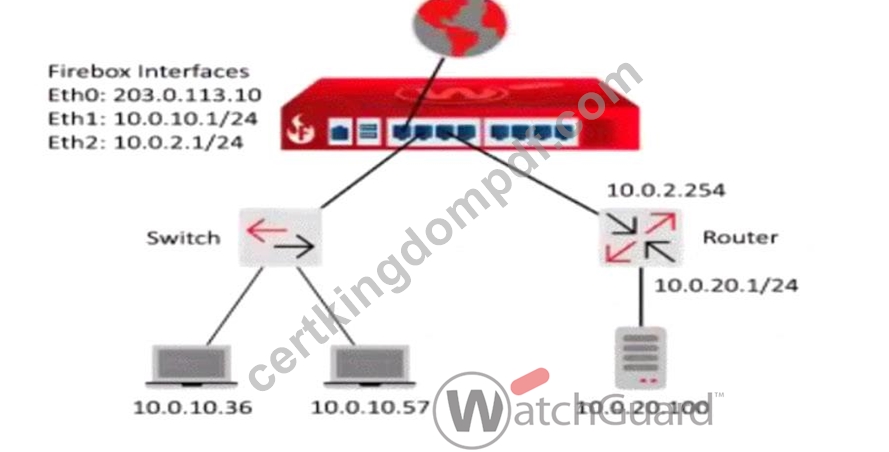
- A. Route to 10.0.20.0/24, Gateway 10.0.2.254
- B. Route to 10.0.20.0/24, Gateway 10.0.2.1
- C. Route to 10.0.2.0/24, Gateway 10.0.2.1
- D. Route to 10.0.20.0/24, Gateway 10.0.2.254
- E. Route to 10.0.10.0/24, Gateway 10.0.0.1
Answer: A
Explanation:
In this network configuration:
* The Firebox needs a static route to direct traffic intended for the 10.0.20.0/24 network (where the server
10.0.20.100 resides).
* The gateway address that allows the Firebox to reach the 10.0.20.0/24 network is 10.0.2.254, which is the router's IP address on the 10.0.2.0/24 network.
By configuring a static route:
* Destination: 10.0.20.0/24
* Gateway: 10.0.2.254
This route instructs the Firebox to send traffic destined for the 10.0.20.0/24 network via the router at
10.0.2.254, enabling clients in the 10.0.10.0/24 network to reach the server.
* Option Bis correct because it provides the correct destination and gateway for traffic to the 10.0.20.0
/24 network.
* Option Aincorrectly sets the route to 10.0.10.0/24, which doesn't address the server network.
* Options C and Dset incorrect gateways (10.0.2.1), which do not route traffic correctly in this setup.
* Option Eis a duplicate of B and would also be correct; thus, B and E are equivalent.
NEW QUESTION # 43
You routinely ship Fireboxes directly to remote offices without configuring them first. What is the zero-touch deployment method you can use to apply a configuration file after a Firebox arrives at a remote office? (Select one.)
- A. RapidDeploy
- B. Dimension Command
- C. WatchGuard System Manager
- D. Firebox Deployment Manager
- E. Fireware Web UI
Answer: A
Explanation:
When shipping Fireboxes to remote offices without pre-configuration, theRapidDeployfeature is designed to facilitate zero-touch deployment. RapidDeploy enables network administrators to apply a pre-configured setup file after the device arrives at its destination.
* Process of RapidDeploy: Administrators can upload a configuration file to the WatchGuard Cloud or another accessible location, from which the Firebox downloads its initial configuration upon connection. This method ensures that even with remote deployment, the Firebox will automatically configure itself based on predefined settings, eliminating the need for manual on-site setup.
* Advantages: RapidDeploy streamlines setup for large-scale, geographically distributed environments where physical access may be limited. This feature is specifically useful for organizations seeking a scalable, efficient deployment process for devices in remote locations.
NEW QUESTION # 44
If you have only one public IP address, can you use Static NAT to enable inbound connections to both an email server and a web server on the private network? (Select one.)
- A. No, you must assign a public IP address to each server
- B. No, you must use Dynamic NAT to route inbound connections to more than one server
- C. Yes, if both servers use different ports
- D. Yes, if both servers are on different private subnets
Answer: C
Explanation:
With only one public IP address, you can still configure Static NAT to route connections to both an email server and a web server, as long as each service is accessed on a different port. For instance, HTTP/HTTPS traffic for the web server can use port 80/443, while the email server can use ports associated with email protocols (e.g., 25 for SMTP). Static NAT can direct incoming requests to different internal servers based on port, making this approach feasible.
NEW QUESTION # 45
You have just configured Mobile VPN with IKEv2 for your customer. By default, authenticated Mobile VPN users are allowed to send traffic to all Firebox networks through the VPN.
- A. True
- B. False
Answer: B
Explanation:
In the default configuration ofMobile VPN with IKEv2, authenticated VPN users are only allowed access to specified networks or resources as defined by the VPN policy. They do not automatically have access to all Firebox networks through the VPN. To enable access to specific networks, administrators need to configure access routes explicitly within the Mobile VPN settings.
NEW QUESTION # 46
Which of these statements are true for this log message? (Select three.)
- A. Application Control detected the application as a virus
- B. The connection used an HTTP Packet Filter
- C. The URL path matched the proxy content type restrictions
- D. The connection was denied
- E. Gateway AntiVirus detected a virus
- F. The connection used an HTTP Proxy
Answer: D,E,F
Explanation:
Analyzing a typical Firebox log message for a denied connection with an associated virus detection involves recognizing multiple elements:
* HTTP Proxy Detection (C): If the connection utilized an HTTP proxy, this is typically noted in the log. Firebox's HTTP proxy is often used to inspect and manage web traffic, including scanning for malicious content.
* Gateway AntiVirus Detection (D): This service scans HTTP traffic for malware and will generate log messages if it identifies a virus. When a virus is detected, the action taken is generally to block the connection.
* Connection Denial (E): When a threat is detected (e.g., a virus via Gateway AntiVirus), Firebox policies are configured to deny the connection to prevent potential infection or data breaches. This is logged as a denied connection.
Other options, such as Application Control detecting a virus or the use of an HTTP Packet Filter, are not relevant in this context based on the function of HTTP proxies and Gateway AntiVirus in Firebox logs.
NEW QUESTION # 47
......
Free Network-Security-Essentials Exam Files Verified & Correct Answers Downloaded Instantly: https://www.certkingdompdf.com/Network-Security-Essentials-latest-certkingdom-dumps.html
Fast Exam Updates Network-Security-Essentials dumps with PDF Test Engine Practice: https://drive.google.com/open?id=182Bna8mj59OFNZjtdT3I7hcfgO8_PXHP