


Pass Your Nutanix NCP-EUC Exam with Correct 180 Questions and Answers
Latest [Aug 02, 2026] 2026 Realistic Verified NCP-EUC Dumps
The NCP-EUC certification exam is an excellent opportunity for IT professionals to showcase their skills and knowledge in Nutanix EUC solutions. Nutanix Certified Professional - End User Computing (NCP-EUC) 6.10 Exam certification is globally recognized and highly valued by employers. By passing the exam, you can enhance your career prospects and demonstrate your expertise in Nutanix EUC solutions.
Nutanix NCP-EUC (Nutanix Certified Professional - End - User Computing) Exam is a certification exam that evaluates the skills and knowledge of IT professionals in deploying and managing Nutanix virtual desktop infrastructure (VDI) solutions. NCP-EUC exam measures the ability of IT professionals to deploy and manage Nutanix VDI solutions, including Nutanix Frame, Citrix Virtual Apps and Desktops, and VMware Horizon. NCP-EUC exam is designed to test the knowledge and skills of IT professionals in the areas of Nutanix VDI architecture, deployment, configuration, and management.
NEW QUESTION # 43
By default, Prism Central provides 18 predefined system report configurations that address common use cases and requirements of an organization's infrastructure management.
What is a valid action for predefined report configurations?
- A. Schedule
- B. Delete
- C. Export
- D. Edit
Answer: A
Explanation:
According to the Prism Central Guide regarding Reporting, predefined system reports (such as Cluster Efficiency, Environment Summary, etc.) are built-in templates provided by Nutanix. The documentation explicitly states that while administrators can view and run these reports, they cannot delete or modify (Edit) the structure of these predefined reports directly.
However, the valid action an administrator can perform on a predefined report is to Schedule it. Scheduling allows the report to run automatically at specified intervals and email the results to recipients. If modification is required, the administrator must first clone the predefined report to create a custom copy, which can then be edited; the original remains locked.
NEW QUESTION # 44
A company is using Citrix for virtual desktops on Nutanix with AHV. The studio has 10,000 users who will be connecting to this infrastructure and have deployed a dedicated Files cluster for holding the user home shares.
Since this is a dedicated cluster with dual Intel 6242 28 GHz 16 Core processors and 192GB of RAM, what should be done for the FSVM and CVM configuration to allow for optimal performance?
- A. Leave the CVM vCPUs et 12 and increase the FSVM vCPUs to 8,
- B. Increase the CVM vCPUs to 16 and the FSW vCPUs to 12.
- C. Increase the CVM RAM to 64GB and the FSVM RAM to 96GB.
- D. Leave the CVM RAM at 32GB and increase the FSVM RAM to 96GB.
Answer: D
Explanation:
https://portal.nutanix.com/page/documents/solutions/details?targetId=TN-2041-Nutanix-Files:file-server-virtual-
https://next.nutanix.com/files-storage-71/command-line-access-to-nutanix-file-server-vm-fsvm-via-ssh-nutanix-f The file server VM (FSVM) is a virtual machine that runs on Nutanix Files and provides file services such as SMB shares and NFS exports. The FSVM is based on CentOS and incorporates all the security and hardening that goes into the Nutanix Controller VM (CVM)2. The CVM is a virtual machine that runs on each node of a Nutanix cluster and provides storage management, data protection, cluster coordination, and other services3.
The FSVMs have some default configuration settings that can be changed depending on your workload requirements. For example, you can change the number of vCPUs, RAM, network interfaces, or disk size of an FSVM2. However, you should not change these settings without consulting Nutanix Support first.
One of the factors that affects the performance of an FSVM is its memory allocation. The more memory an FSVM has, the more cache it can use for file operations. This can improve the throughput and latency of file serving workloads4. Therefore, increasing the FSVM RAM to 96GB can help optimize its performance for a large number of users.
NEW QUESTION # 45
Recently, the vice president Of IT infrastructure was migrated from a physical computer to a virtual desktop.
The administrator wants to ensure that this user has the best possible experience and wants to be notified if any CPU resource constraints.
The cluster's average CPU utilization is 20%.
What step would help the administrator to know when there are resource problems on the virtual desktop?
- A. Create a new alert policy to alert if the CPU on the virtual desktop is over and configure a Playbook to power off the virtual desktop.
- B. Create a new alert policy to alert if the CPU on the virtual desktop is over and configure a Playbook to Slack the information to the administrator,
- C. Create a new alert policy to alert if the CPU on the virtual desktop's host is over 90%.
- D. Create a new alert policy to alert if the CPU on the virtual desktop's cluster is over 90%.
Answer: B
Explanation:
alert policies are rules that define the conditions for generating alerts on Nutanix clusters1. You can create custom alert policies based on your specific needs and preferences2Playbooks are automated workflows that perform actions based on triggers such as alerts3. You can create playbooks using predefined alerts or alerts matching criteria3.
To ensure that the vice president of IT infrastructure has the best possible experience and to be notified if any CPU resource constraints on the virtual desktop, one possible solution is to create a new alert policy to alert if the CPU on the virtual desktop is over a certain threshold (for example, 80%) and configure a playbook to send a notification (for example, via email or Slack) to the administrator23. This way, the administrator can monitor the performance of the virtual desktop and take appropriate actions if needed.
https://portal.nutanix.com/page/documents/details?targetId=Prism-Central-Guide-vpc_2022_6:mul-alert- policies-customize-system-pc-t.html
NEW QUESTION # 46
An administrator is asked to configure a container to support 2000 non-persistent linked clone desktops.
What is the optimal configuration of this container?
- A. Deduplication Only
- B. Compression, Deduplication, and ECX
- C. Compression Only
- D. Compression and Deduplication
Answer: C
Explanation:
Comprehensive and Detailed Explanation From Exact Extract of Nutanix End User Computing documents:
According to Nutanix storage best practices for Virtual Desktop Infrastructure (VDI), the optimal configuration for Linked Clones is Compression Only.
* Linked Clones and Data Efficiency: In a Linked Clone environment, the Virtual Machines (VMs) already share a common base image (replica disk) at the hypervisor level. Because the identical operating system data is already shared via the cloning technology, the Nutanix Distributed Storage Fabric (DSF) manages this duplicate data efficiently without needing the Deduplication feature enabled on the container.
* Redundancy of Deduplication: Nutanix technical documentation explicitly states that for Linked Clones or Nutanix VAAI clones, deduplication provides no additional benefit because the data is already single-instanced. Enabling deduplication in this scenario would introduce unnecessary metadata overhead without delivering significant capacity savings.
* Role of Compression: Inline Compression is recommended for almost all workloads, including VDI. It effectively reduces the size of the unique data written to the delta disks (user data, temp files, and logs) associated with non-persistent desktops, maximizing storage efficiency without the performance cost of deduplication.
* Shadow Clones: For the read-heavy workload of 2000 desktops accessing the same base image, Nutanix utilizes Shadow Clones (enabled by default) to cache the "hot" replica disk locally on every node, ensuring high performance during boot storms, rendering the need for "performance tier deduplication" redundant for linked clones.
Summary of Best Practice:
* Full Clones / Persistent Desktops: Compression + Deduplication.
* Linked Clones / Non-Persistent Desktops: Compression Only.
NEW QUESTION # 47
An administrator supports a user group that spans across 10 Nutanix clusters for a medium-sized medical communications firm. The 10 Nutanix clusters are managed by a single Prism Central instance.
This group's virtual desktops are all cloned from a common gold image and all applications are published from a Citrix Virtual Apps farm. The administrator needs to keep the gold image in sync across all of the clusters.
What is the best way to achieve this?
- A. Upload the gold image to Prism Central Image Service.
- B. use Move to maintain all gold images across the clusters.
- C. use the native replication facility within the Machine Catalog
- D. Setup a Protection Domain with the gold image as 3 protected entity.
Answer: A
Explanation:
Prism Central Image Service allows you to upload and manage images through Prism Central by using the v3 API. You can also choose where your images will be available across different clusters123
https://next.nutanix.com/ncm-intelligent-operations-formerly-prism-pro-ultimate-26/prism-central-adding-image
NEW QUESTION # 48
An administrator has this configuration:
Category DesktopVM associated with a non-default storage policy
A Virtual Machine Desktop1 associated with the DesktopVM category
A virtual machine with the Enable 'Default-Storage' policy toggle switch enabled The administrator notices that expected storage policy settings are not applied.
What is the reason for this?
- A. When two or more storage policies are applied, they both are applied.
- B. Default storage policy is ignored when using categories.
- C. When two or more storage policies are applied, they both are ignored.
- D. Non-default storage policy gets precedence over the default storage policy.
Answer: D
Explanation:
Comprehensive and Detailed Explanation From Exact Extract of Nutanix End User Computing documents:
According to the Prism Central Guide on Storage Policy Management and Precedence Rules:
* Precedence Rule: Nutanix documentation explicitly states: "If you assign a category associated with a non-default storage policy to an entity and also enable the Enable 'Default-Storage' policy toggle switch, the non-default storage policy gets precedence over the default storage policy."
* Explanation: The "Default-Storage" toggle acts as a fallback or baseline policy assignment (specifically linking the VM to the Storage: $Default category). However, if the administrator specifically tags the VM with a user-defined category (like DesktopVM) that has its own specific storage policy, the system honors the specific (non-default) policy over the generic default one.
* Result: The "expected" settings (if the administrator expected the Default policy to override the specific one because they toggled the switch) are not applied because the specific category policy takes priority.
NEW QUESTION # 49
An administrator wants to allow Citrix MCS integration with AHV.
Which component needs to be installed and where should it be deployed?
- A. Citrix MCS AHV Plug-in on AHV
- B. Citrix Desktop DC Plug-in on Prism Element
- C. Nutanix AHV MCS Plug-in on Citrix XenDesktop DC
- D. Nutanix AHV MCS Plug-in on Prism Central
Answer: C
Explanation:
According to Nutanix Support & Insights3, you need to install the Nutanix AHV plugin for Citrix Virtual Apps and Desktops on Delivery Controllers (also called the MCS plugin SDK) to create and manage Citrix-provisioned VMs in a Nutanix AHV infrastructure environment.
NEW QUESTION # 50
A persistent desktop that is already configured for inline-compression can take advantage of which other storage space-saving technology?
- A. Inline Erasure Coding
- B. Increased Redundancy Factor
- C. Storage Pools
- D. Capacity Deduplication
Answer: A
Explanation:
For persistent desktop workloads (full clones) where data efficiency is critical, Nutanix recommends leveraging Inline Compression as the primary reduction technology. To further optimize storage capacity without the heavy memory overhead associated with Deduplication, the recommended complementary technology is Erasure Coding (specifically Inline Erasure Coding in newer AOS versions or EC-X post- process).
Erasure Coding increases the effective usable capacity of the cluster by stripping data parity across nodes (similar to RAID 5/6 logic) rather than relying on the default Replication Factor 2 (RAID 1 logic) for cold or write-cold data. Since persistent desktops often contain large amounts of static data after the initial OS and application installation, Erasure Coding significantly reduces the storage footprint. While Capacity Deduplication (Option D) is available, it is generally reserved for specific use cases (like full clone setups with high data commonality) due to its high RAM requirement for fingerprint metadata, making Erasure Coding the more universally applicable "other" technology for general persistent VDI.
NEW QUESTION # 51
The deployment of a new desktop from a Citrix PVS snapshot template is failing. While investigating, the administrator finds that the creation of the VM's write-cache disk failed.
What is a possible cause of this failure?
- A. The VM template is configured with a SATA disk controller.
- B. The VM template does not have a virtual NIC configured.
- C. The VM template has a CDROM drive provisioned.
- D. The VM template snapshot has a virtual disk attached.
Answer: D
Explanation:
In a Nutanix AHV environment integrated with Citrix Provisioning (PVS), the XenDesktop Setup Wizard (or Citrix Virtual Desktops Setup Wizard) is responsible for creating the Write Cache disk for target VMs during the provisioning process.
According to Nutanix Knowledge Base articles regarding PVS on AHV, a common cause for the failure of the write-cache disk creation is the presence of an attached virtual disk on the snapshot used as the template. The wizard expects to create and attach the write-cache disk itself. If the template snapshot already has a hard disk attached (other than the potential CD-ROM, which is generally supported if single), the wizard's logic for disk slot assignment or disk creation conflicts with the existing disk, causing the "creation of the VM's write-cache disk failed" error. The supported procedure explicitly states that the VM template snapshot must be created without any hard disks attached.
NEW QUESTION # 52
An administrator is researching a problem with virtual desktops hosted on AHV clusters. Users report intermittent issues when viewing video in VDI desktops. The problem exhibits as hung/frozen display frames and problems starting the streaming video.
Which network configuration could cause the issue?
- A. Balance-SLB
- B. Active-Backup
- C. Route based on physical NIC load
- D. Route based on IP hash
Answer: A
Explanation:
The default load balancing configuration in Nutanix AHV is Balance-SLB (Source Load Balancing). This setting utilizes all available uplinks by assigning VM traffic to specific uplinks based on source MAC address hashing. To optimize bandwidth usage, the Balance-SLB algorithm periodically evaluates link utilization and may rebalance traffic by moving a VM's assignment from one uplink to another.
According to Nutanix AHV Networking documentation, this rebalancing action involves sending a gratuitous ARP (RARP) to update the physical switch. During this split-second transition, real-time sensitive traffic- such as streaming video or VoIP-may experience dropped packets or out-of-order delivery, resulting in symptoms like "hung/frozen display frames." For environments prioritizing connection consistency over aggregate bandwidth for single VMs (like VDI with streaming requirements), Active-Backup is often recommended to eliminate the potential for rebalancing interruptions. (Note: Option A is a VMware ESXi terminology, not AHV).
NEW QUESTION # 53
Users are reporting that their desktops are running slower than expected in an ESXi-based Nutanix cluster. upon investigation, an administrator determines that desktops on one host are running slower and have higher CPU Ready times than on other hosts.
What is causing this issue?
- A. Inline Compression has been disabled on the desktop storage container
- B. Erasure coding's increased overhead has caused a slowdown in the environment
- C. High Performance host power policy is disabled
- D. High Performance host power policy is enabled
Answer: C
Explanation:
A high CPU Ready time means that the vCPU is waiting too long for the pCPU, which can result in poor performance and slow responsiveness of the virtual machine (VM).
According to Nutanix best practices2, one of the factors that can affect CPU Ready time is the host power policy. The host power policy determines how aggressively the host will try to save power by reducing the frequency or voltage of the pCPUs.
The recommended host power policy for Nutanix clusters is High Performance, which disables any power saving features and ensures that the pCPUs run at their maximum frequency and voltage.
This answer seems to explain why desktops on one host are running slower and have higher CPU Ready times than on other hosts, as they may be suffering from reduced pCPU performance due to a lower host power policy.
NEW QUESTION # 54
What are two types Of Frame environment delivery models? (Choose two.)
- A. Frame on HP running Hyper-V.
- B. Nutanix private cloud model running AHV
- C. BYO public cloud
- D. Frame on Cisco LICS running VMware ESXi
Answer: B,C
Explanation:
Frame is a cloud-native desktop-as-a-service platform that allows you to deliver virtual desktops and applications from any cloud. Frame supports multiple public clouds, such as AWS, Azure, GCP, and Alibaba Cloud2. You can bring your own public cloud account and use Frame to provision and manage your virtual desktops on demand.
Frame also supports Nutanix private cloud model running AHV, which is a native hypervisor for Nutanix Enterprise Cloud Platform. You can use Frame to deliver virtual desktops and applications from your own data center using Nutanix AHV clusters3. You can benefit from the simplicity, scalability, and performance of Nutanix hyperconverged infrastructure.
NEW QUESTION # 55
An administrator has been evaluating a performance issue with the current Citrix VD' solution on Nutanix.
During the evaluation, the administrator finds out there is a feature that is enabled called Shadow Clones.
What would happen if an administrator disabled Shadow Clones within a company's VDI environment?
- A. Boot storms would be eliminated because the number of desktops would be throttled.
- B. Boot storms would be eliminated due to desktop resource contention.
- C. Deployment times would increase as the number deployed desktops increase,
- D. Deployment times would decrease when deploying additional desktops.
Answer: C
Explanation:
Nutanix's Shadow Clones feature is used to create linked clones or snapshots of base VMs, which can improve VM provisioning time and storage efficiency by reducing the amount of duplicated data.
If an administrator disables Shadow Clones within a company's VDI environment, it is likely that deployment times would increase as the number of deployed desktops increases. This is because linked clones or snapshots would no longer be used, so each new desktop deployment would require creating a full copy of the base VM.
Nutanix Shadow Clones allow for distributed caching of a particular disk or VM data, which are in a
'multi-reader' scenario. This can help in scenarios such as VDI or private clone boot storms, where VMs on multiple nodes read from the same set of base disks12
NEW QUESTION # 56
Which solution will allow the administrator to customize this user experience?
- A. Virtual Disk Based Profile
- B. user Profile Management Solution
- C. Mandatory or Local Profile
- D. user Environment Management
Answer: B
Explanation:
Users may expect some level of personalization and consistency across their virtual desktop sessions, even if they do not save any changes1. To customize this user experience, administrators can use different solutions that manage user profiles and settings1.
NEW QUESTION # 57
An administrator has been tasked with increasing security by setting permissions based on department.
Which feature can the administrator use to best accomplish this task?
- A. Cluster Lockdown through PC
- B. Creation of a single local user for each department
- C. Securing traffic by through Network Segmentation
- D. Role-based access control (RBAC)
Answer: D
Explanation:
Comprehensive and Detailed Explanation From Exact Extract of Nutanix End User Computing documents:
According to the Prism Central Admin Guide regarding Security and User Management:
* RBAC Definition: Role-Based Access Control (RBAC) is the specific feature designed to map users and groups (such as an Active Directory "Department" group) to specific sets of permissions (Roles).
* Application: An administrator can define a role (e.g., "HR Admin") with specific privileges and assign it to the "HR Department" AD group. This ensures that permissions are granted granularly based on the department, fulfilling the security requirement efficiently.
* Why not others:
* Network Segmentation controls traffic flow (who can talk to whom), not administrative permissions.
* Cluster Lockdown disables password authentication for SSH, which is a hardening step, not a permission management strategy.
NEW QUESTION # 58
An administrator attempts to create a Machine Catalog for Windows 11 desktops in Citrix utilizing Machine Creation Services (MCS), but the desktops fail to register on startup.
What could be preventing registration?
- A. Time is off on the machines.
- B. Invalid characters in Machine name.
- C. No RDS Licenses are available.
- D. Insufficient CPU/Memory allocated to machines.
Answer: A
Explanation:
For a Citrix VDA (Virtual Delivery Agent) to successfully register with the Delivery Controller, it must establish a secure communication channel which relies heavily on Kerberos authentication.
A common cause for registration failure on startup, particularly in new deployments or non-persistent environments, is that the Time is off on the machines. If the system clock of the virtual desktop drifts more than 5 minutes from the domain controller or the Delivery Controller, Kerberos ticket generation fails. This prevents the VDA from authenticating with the Broker Service, resulting in a "Unregistered" state in Citrix Studio. While Windows 11 has strict hardware requirements (Option A), failing to meet those usually prevents the OS from booting or installing entirely; if the OS boots but fails to register, time synchronization is the most probable infrastructure cause.
NEW QUESTION # 59
A Citrix administrator is creating a new machine catalog on AHV for a new cluster. After validating the AHV plugin is installed, the catalog is unable to be created because no resources were found.
Which step must be completed first to resolve this issue?
- A. Use a Nutanix Playbook to update the target config.
- B. Create a new hosting connection in Citrix Studio.
- C. Create a delivery group.
- D. Install VirtIO drivers.
Answer: B
Explanation:
In the Citrix Studio workflow, before a Machine Catalog can be created for a specific infrastructure, a Hosting Connection (or Host Connection) must be established. This connection links the Citrix control plane to the specific hypervisor (Nutanix AHV) and defines the resources (such as storage containers and networks) available for provisioning.
If the administrator is setting up a "new cluster" and attempts to create a catalog but finds that "no resources were found," it indicates that either no Hosting Connection exists for that new cluster, or the existing connection does not include the storage/network resources of the new cluster. Therefore, the immediate resolution is to create a new hosting connection in Citrix Studio that points to the new AHV cluster, ensuring the appropriate networks and containers are selected as available resources.
NEW QUESTION # 60 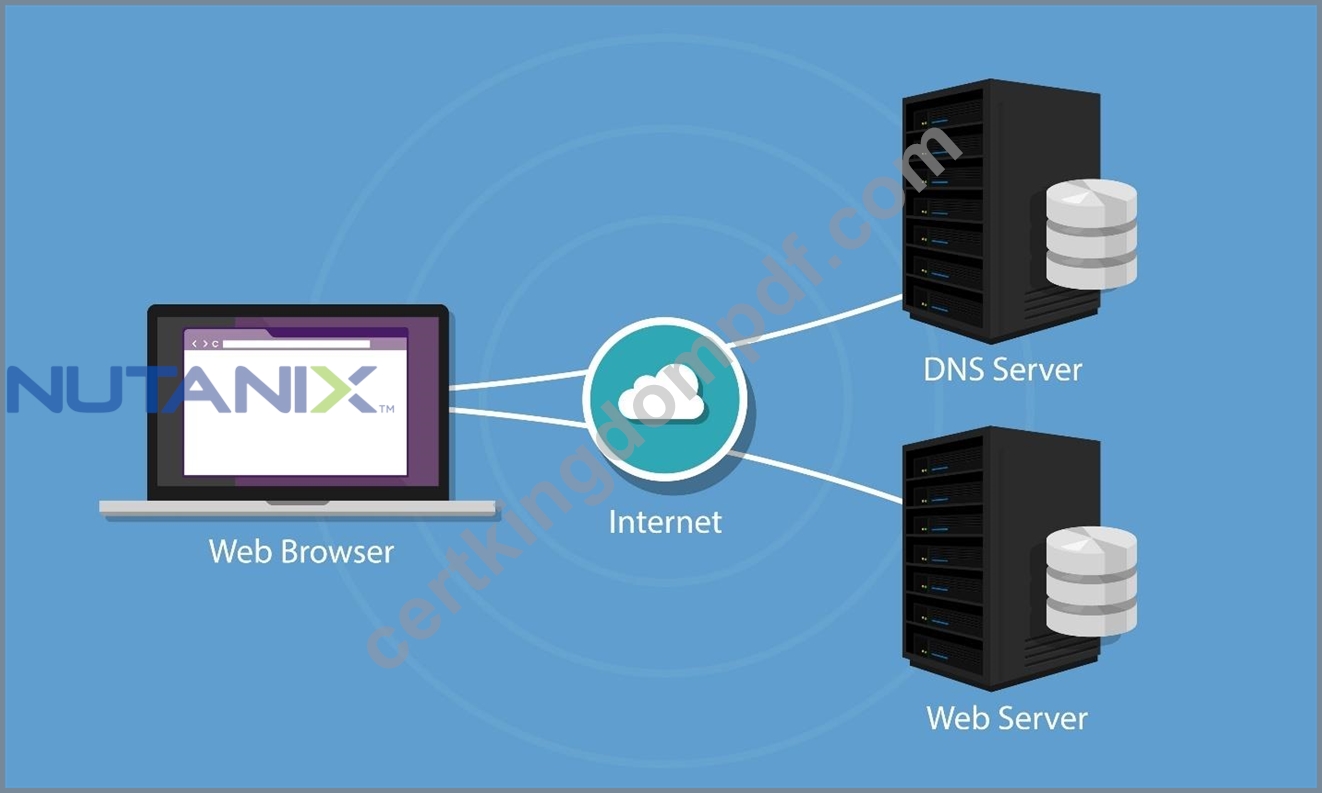
Shutterstock
An administrator is using EUC broker software to manage and direct connections to virtual desktops and applications. The administrator is being asked to make sure traffic is distributed across the broker VMs and wants to make sure the best solution is being implemented.
How can the administrator best accomplish this goal?
- A. Use Nutanix Data Lens to provide efficiency across VMs.
- B. Use Flow Virtual Networking and external load balancers.
- C. Use round-robin DNS to distribute connections.
- D. Use the virtual switch in active-active mode across all hosts.
Answer: C
Explanation:
In the context of distributing connections across multiple broker VMs (such as Citrix Delivery Controllers or Horizon Connection Servers) without introducing complex third-party infrastructure dependencies like strict SDN overlays (Option A), Round-robin DNS is the standard supported method for connection distribution mentioned in basic Nutanix EUC architecture guides.
While enterprise production environments often use dedicated External Load Balancers (like Citrix ADC), Option A implies the mandatory use of Flow Virtual Networking (an overlay SDN solution) to achieve this, which is not a standard requirement for simple broker load balancing. Therefore, among the available choices, creating multiple DNS A-records for the broker FQDN (Round-robin DNS) is the valid mechanism to distribute incoming user traffic across the available broker nodes.
NEW QUESTION # 61
An administrator has a 3-node ESXi-based Nutanix cluster where one host has an NVIDIA GPU installed.
The administrator is planning to perform an ESXi upgrade using Nutanix Life Cycle Manager (LCM) and requires the NVIDIA vGPU-enabled VM to remain online throughout the maintenance window.
What should the administrator do to successfully complete this task?
- A. Hot-swap the GPU between hosts.
- B. Configure VMware HA and DRS.
- C. Temporarily disable the vGPU.
- D. Install a GPU in a second host.
Answer: D
Explanation:
Comprehensive and Detailed Explanation From Exact Extract of Nutanix End User Computing documents:
According to Nutanix LCM and NVIDIA vGPU operational best practices:
* Live Migration Requirement: To keep a VM "online" during a host upgrade, the VM must be live- migrated (vMotioned) off the host entering maintenance mode.
* vGPU Constraint: A VM configured with a vGPU profile cannot be live-migrated to a host that does not have a compatible physical GPU resource available.4 The destination host must have a GPU capable of hosting the specific vGPU profile.
* The Solution: Since only one host currently has a GPU, there is no valid destination for the VM to migrate to. The administrator must install a GPU in a second host to create a valid migration target.
This allows the VM to vMotion to the second host, keeping it online while the first host is upgraded.
NEW QUESTION # 62
......
Nutanix NCP-EUC Exam is a vendor-neutral certification exam, which means that it is not tied to any particular hardware or software vendor. NCP-EUC exam is designed to be applicable to a wide range of IT professionals, including those who work with Nutanix VDI solutions as well as those who work with other VDI solutions. NCP-EUC exam is also designed to be challenging and comprehensive, covering a wide range of topics and requiring a deep understanding of Nutanix VDI architecture, deployment, configuration, and management.
Get 2026 Updated Free Nutanix NCP-EUC Exam Questions and Answer: https://www.certkingdompdf.com/NCP-EUC-latest-certkingdom-dumps.html
Pass NCP-EUC Exam Updated 180 Questions: https://drive.google.com/open?id=1p1bQSenc6v5a8Rsx7ITaV0ruhUC3EytL